AI scribing tools can turn that 30-minute task into a 5-minute review. They transcribe your session, structure the notes in your preferred format, and hand them back to you for approval.
You finish a session, walk your client out, and now you have fifteen minutes before the next one arrives. In that window, you’re supposed to write notes that are accurate, thorough, and reflective of everything that just happened — while also sanitizing your table, checking your schedule, and maybe eating something.
Most practitioners spend 15 to 45 minutes per session on documentation. Multiply that across a full week and you’re looking at hours of non-billable time devoted to something that, while essential, isn’t why you got into this work. And if you’re like most practitioners, the notes you write at the end of a long day are less detailed than the ones you wrote at 9 a.m.
AI scribing tools can turn that 30-minute task into a 5-minute review. They transcribe your session, structure the notes in your preferred format, and hand them back to you for approval. You still make every clinical decision. You still own the documentation. The tool handles the part where your words become organized text.
This guide walks you through choosing a tool, setting it up, and running your first test note — all in under an hour.
What these tools do (and what they don’t)
An AI scribe records the audio of a session, transcribes the conversation, and then uses that transcript to generate structured clinical notes — typically in SOAP format (Subjective, Objective, Assessment, Plan), though many tools support other formats. It also organizes your session notes by client.
What the tool does: transcription, summarization, and structure. It turns a conversation into a document.
What stays with you: clinical judgment, diagnosis, treatment decisions, and everything that requires your training and your knowledge of the person sitting in front of you.
A recent quality improvement study across six healthcare systems found that after 30 days with an ambient AI scribe, clinician burnout dropped from 51.9% to 38.8%, with significant improvements in after-hours documentation time and focused attention on patients. You don’t need a study to tell you that writing notes at 10 p.m. isn’t sustainable, but it’s worth knowing the pattern is documented. (Source: JAMA Network, October 2025)
Choosing the right tool
Most AI scribe guides are written for psychiatrists, primary care physicians, or large clinical practices. The tools they recommend are often expensive, built around insurance billing workflows, and designed for medical terminology that has nothing to do with acupuncture points, myofascial release, or TCM pattern differentiation.
Here’s what matters for holistic practitioners specifically:
Does it know your modality? Some tools let you select your specialty during setup — yoga therapy, acupuncture, TCM, herbalism, massage. This shapes how the AI structures your notes and what terminology it expects. A tool built for primary care will produce notes that read like a physician’s office visit, which is probably not what you need.
Does it protect your clients’ data? This is non-negotiable. You want a tool that doesn’t train its AI on your session data, stores information in HIPAA-compliant infrastructure, and ideally destroys audio recordings after generating the transcript and notes. If a tool can’t answer these questions clearly, keep looking.
Can you afford it? Healthcare compliance can be expensive. Some tools start at $80–100/month, which is hard to justify when you’re running lean. Others offer meaningful free tiers. Usually pricing is freely available on provider websites.
Is setup simple? You should be able to go from creating an account to running a test note in under an hour. If the onboarding requires IT support or multi-step integrations, it’s not built for you.
Three tools worth considering
Heidi Health — This is the standout for holistic practitioners, and the one I’d start with.
Heidi offers an always-free tier, which immediately removes the cost barrier. When you create your account, you enter your region and specialty. The specialty list includes Yoga Therapy, Acupuncture, TCM, Herbalism, and many other modalities and health disciplines. This means the AI is oriented toward your clinical language from the start, not trying to retrofit a primary care template.
Privacy is strong: Heidi does not train on your data, stores everything in HIPAA-compliant infrastructure, and destroys audio after the transcript and notes are generated. When you record a session, you can choose the patient and session type (intake or ongoing), add context, and organize notes by client. After you’ve collected notes for a client over time, you can ask questions to retrieve important information across sessions.
It’s accessible on phone and desktop, setup is fast, and the free tier is genuinely usable, not a bait-and-switch for a paid plan.
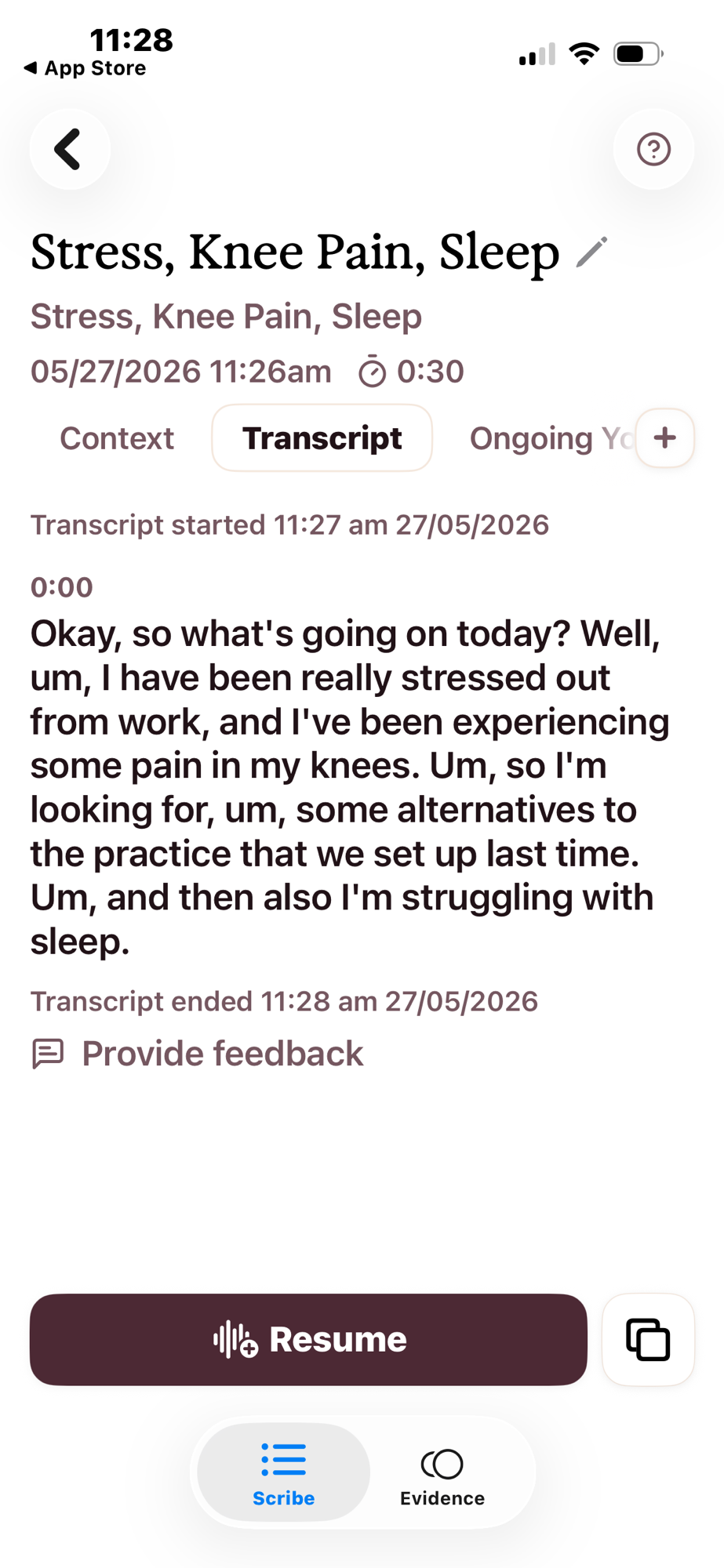
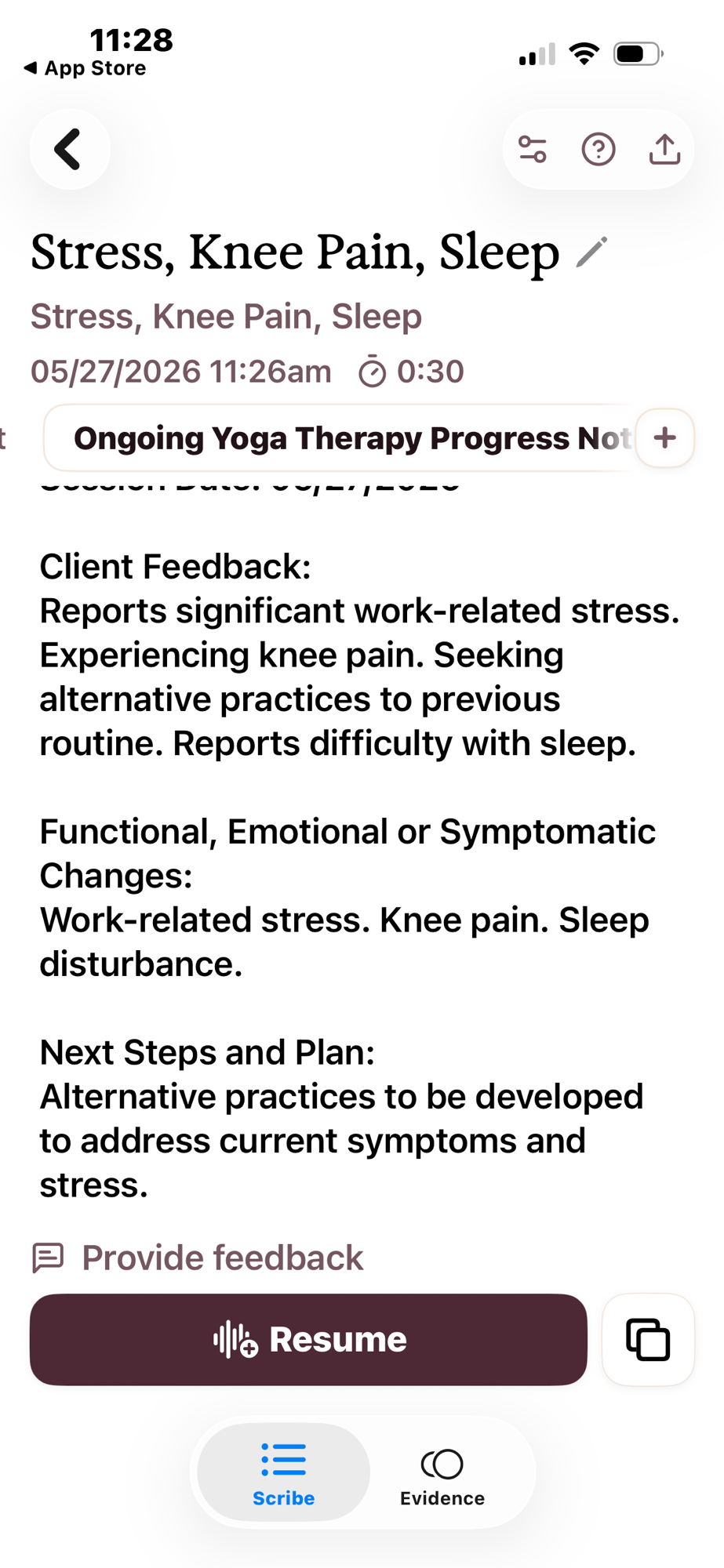
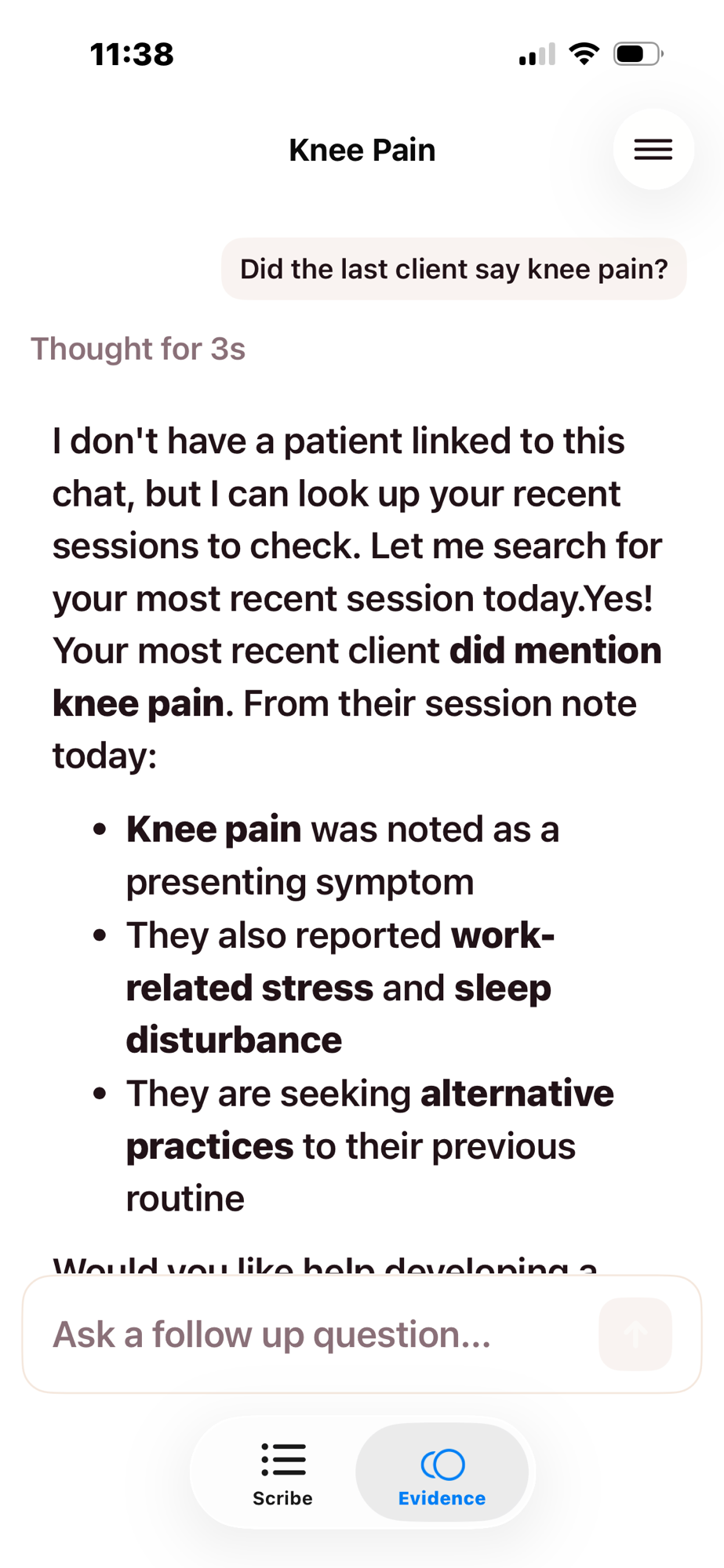
Screenshots from the Heidi App show the process of recording and checking session notes for a Yoga Therapy session.
Freed AI — Freed is purpose-built for clinical documentation and has a strong reputation among therapists and physicians. The note quality, particularly for narrative-style documentation, is consistently praised.
The trade-off is cost. Freed starts at $40/month for one clinician with up to 40 notes per month. That might work for a practitioner seeing 8–10 clients per week, but it gets tight fast. Beyond that, pricing jumps to $80/month and then up to $104/month for more advanced AI features. For a solo wellness practitioner, that’s a meaningful line item.
The other consideration: Freed’s terms of service state that the company may “collect, use, publish, disseminate, sell, transfer, and otherwise exploit” de-identified and aggregated data derived from user inputs. That language has raised concerns among clinicians. The data is described as anonymized, but the breadth of the clause is worth noting.
If cost isn’t a barrier and the data terms don’t concern you, Freed produces excellent notes. But for most practitioners reading this guide, Heidi offers comparable quality at a fraction of the cost (or free), with a stronger privacy posture.
Otter.ai — Otter is a general-purpose transcription tool, not a clinical scribe. It doesn’t produce SOAP notes, doesn’t organize by client, and doesn’t have clinical knowledge built in. But it’s affordable (free for 30-minute transcripts, $9/month for 90 minutes, $20/month for up to 4 hours), and for practitioners who want a raw transcript they can work from rather than a formatted clinical note, it gets the job done.
The limitation is organizational. You’d need to create your own system for linking transcripts to client files because Otter won’t do that for you. And HIPAA compliance is only available at the enterprise tier. For personal reference notes that don’t contain identifiable health information, Otter works. For clinical documentation, the purpose-built tools are a better fit.
One note worth mentioning: Otter does use de-identified user data to train its models. The process is automated and audio isn’t manually reviewed, but the data does enter their training pipeline.
What about Jane’s AI Scribe?
If you already use Jane for practice management, their AI Scribe feature is worth looking at. It’s built directly into the platform, which means your notes stay in the same system as your scheduling and client records.
One acupuncturist who tested it on a 12-patient day reported that it cut her charting time by roughly two hours and actually produced better notes than she typically wrote herself — because she was no longer multitasking during the intake conversation. She asked each patient for consent using simple language: “I have a new note-taking app for my charting software. Do you mind if I use it?” Every patient said yes. (Source: “Jane AI Scribe Review: How It Saves Me Hours of Charting as an Introvert Acupuncturist,” Michelle Grasek)
Jane’s AI Scribe is HIPAA and PIPEDA compliant, doesn’t share your data with other clinics or use it to train AI features, and lets you delete recordings immediately after notes are generated.
The trade-off is that AI Scribe is an add-on to Jane’s existing pricing, so evaluate it against the standalone tools above based on what you’re already paying and what workflow integration is worth to you.
The setup, step by step
This section uses Heidi as the example, since it’s free and accessible. The general process is similar across tools.
Step 1: Create your account (5 minutes)
Go to heidihealth.com, create an account, and select your region. When prompted for your specialty, choose the one closest to your modality. Download the app on your phone or access it from your desktop, whichever you’ll use during sessions.
Step 2: Configure your note format (10 minutes)
Before you record anything, tell the tool how you want your notes structured. Most tools default to SOAP format, but you can customize: which sections to include, how detailed each section should be, whether to use bullet points or narrative paragraphs, and what terminology to use or avoid.
This is the step that pays dividends. Spending 10 minutes here means less editing on every note going forward.
Step 3: Run a test session (15 minutes)
Don’t start with a real client session. Record yourself talking through a hypothetical session, or ask a friend or colleague to play the client role for 5–10 minutes. This lets you test audio quality, see how the tool handles your terminology, and get comfortable with the workflow before there’s a real person on the table.
Review the output. Is the structure right? Did it capture the key details? Where did it get things wrong? Use this to refine your note format settings before going live.
Step 4: Do a real session with consent (15–20 minutes)
Pick a client you have a comfortable relationship with. Before the session, let them know you’re trying a new documentation tool and ask if they’re willing to be your test case.
Simple language works: “I’m trying a new note-taking tool that records our conversation and turns it into session notes. The recording is deleted after the notes are generated, and nothing is shared with anyone. Would you be comfortable with that?”
Run the session, review the notes afterward, and note what needs adjusting.
Step 5: Refine (ongoing)
The first few sessions will require more editing than later ones. As you refine your settings and the tool learns your documentation style, the review time shrinks. Within a week or two, you could be spending 2–5 minutes per note instead of 15–45.
Reviewing and editing the output
AI-generated notes are drafts, not finished documents. They need your review every time. Here’s what to watch for:
Terminology errors. General-purpose AI doesn’t always know your clinical language. It might transcribe “qi stagnation” as “chi stagnation” or miss a modality-specific term entirely. Tools that let you select your specialty handle this better, but you’ll still catch errors in the first few sessions.
Hallucinations. This is the industry term for when AI inserts information that wasn’t actually said. It’s rare in good tools, but it happens. In a clinical documentation context, it’s not just annoying, it’s potentially harmful. Always read the notes against your memory of the session. If something doesn’t sound right, it probably wasn’t said.
Structural mismatches. The tool might put information in the wrong SOAP section, or organize the note in a way that doesn’t match how you think about the session. This usually improves as you refine your settings, but it’s worth catching early.
The 2-minute review habit. After the tool generates your notes, read them once, quickly. Fix errors, add anything the AI missed (treatment details you didn’t verbalize, clinical observations from palpation or visual assessment), and approve. Over time, this becomes routine.
Integrating it into your workflow
Where notes fit in the session sequence
Most practitioners record during the intake portion of the session — the conversation at the beginning where the client describes how they’re feeling, what’s changed since last time, and what they’d like to address. You stop recording before hands-on treatment, then add your treatment notes (points used, techniques applied, client response) manually after the session.
Some practitioners record the entire session, including verbal observations during treatment. This depends on your modality, your comfort level, and whether continuous narration feels natural in your practice setting.
Client consent
Ask every time, at least until it’s established. Simple, direct language. Don’t overexplain or apologize. If a client says no, respect it without hesitation and take notes the way you always have. Most clients will say yes. The ones who don’t will appreciate that you asked.
If consent feels awkward, try this framing: the recording is for your documentation only. It’s deleted after the notes are generated. Nothing is shared. You’re doing this so you can be more present during the session instead of splitting your attention between listening and writing. That’s usually enough.
For more on how to communicate about AI tools to clients, see “How to Be Upfront About AI in Your Practice: A Disclosure Guide”
When the tool fails
It will, occasionally. Poor audio quality (background noise, soft-spoken clients, a treatment room with hard surfaces that create echo), software outages, or a session that doesn’t lend itself to transcription — like a deeply emotional conversation where pulling out a recording device would be inappropriate.
Have a fallback. Keep a notepad or a simple note template on your phone for sessions where recording isn’t possible or appropriate.
Sensitive sessions
Some sessions shouldn’t be recorded. A client disclosing trauma, a conversation that veers into territory where a recording device would change the dynamic, or a session where the client agreed to recording in general but this particular conversation feels different. Always trust your judgment. You can write notes by hand for one session without losing the benefit of the tool for all the others.
What this looks like in practice
The first week, you’ll spend more time setting up and adjusting than you save. That’s normal. By the second week, most practitioners report that note-taking has gone from a dreaded end-of-day chore to something that’s mostly handled by the time they walk their client out.
The hours you get back are yours to decide what to do with. More client sessions, if that’s what you want. More time between sessions, if that’s what you need. Less “pajama time” — the medical industry term for charting done at home in the evening, after the workday was supposed to be over.
One acupuncturist put it this way: she was still a little tired after a 12-patient day, but she felt lighter than usual. The charting wasn’t hanging over her. Her mental load was lower. And the notes were actually better than what she’d been writing by hand.
That’s the promise of this kind of tool. Not that it replaces your clinical expertise, but that it gives you back the bandwidth to use it.
Quick reference
Recommended starting point: Heidi Health (free tier, holistic modality support, strong privacy)
Setup time: 45–60 minutes including first test note
Ongoing review time per note: 2–5 minutes once you’ve refined your settings
What to say to clients: “I’m using a documentation tool that records our conversation and turns it into my session notes. The recording is deleted afterward and nothing is shared. Are you comfortable with that?”
What to do if a client says no: Take notes by hand. No explanation needed.
What to watch for: Terminology errors, hallucinated details, structural mismatches. Always review before approving.